

React component renders
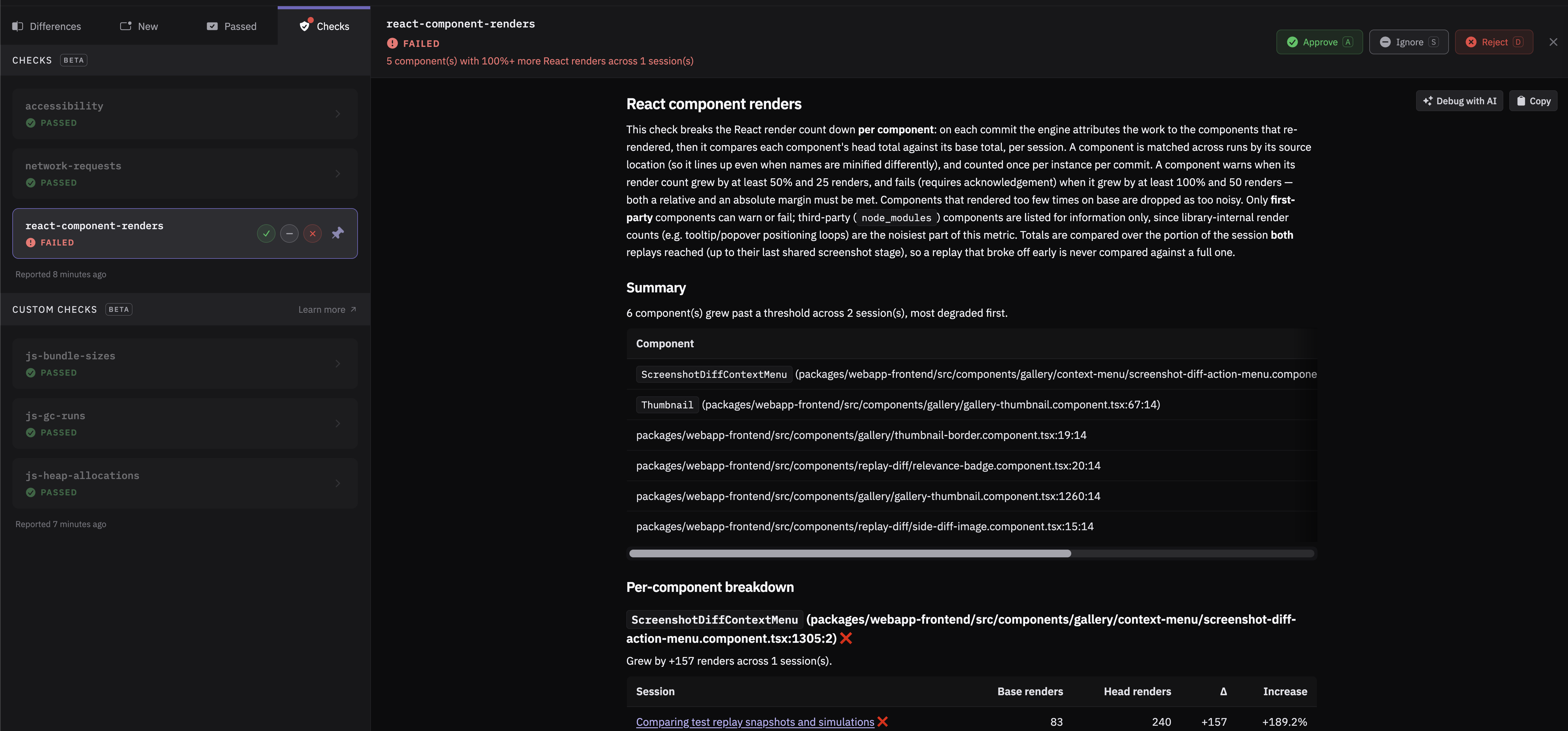
Meticulous checks whether a pull request introduces a regression in how many times your React components render. Render regressions rarely show up visually — the page looks identical while a component quietly re-renders hundreds of extra times. This check can block a pull request with this kind of regression from being merged, preventing the author from introducing a frontend performance regression.
When does the check fail?
If Meticulous finds a component that renders at least 100% more in a user flow, it marks the React component renders status check as failed on the pull request, requiring the author to acknowledge the result in Meticulous before the pull request can proceed. A component that renders at least 50% more is reported as a warning that leaves the check passing. The thresholds are configurable on Settings → Checks.
Which components are considered?
Only first-party components are considered, since third-party components typically provide a weaker signal.
Does the check block merging?
The react component renders check is blocking by default, but it can be configured to never block pull requests. You can change this yourself on Settings → Checks, no Meticulous admin needed.
How can react component renders testing be enabled?
Reach out to the Meticulous team at support@meticulous.ai and we'll turn it on for your project. The check can optionally be enabled for a subset of users rather than the entire team.